AI automation for Nigerian and African businesses

Give the repetitive work to AI. Keep the decisions

We find the reading, sorting, answering and data entry your team repeats every day, then build AI into the workflows and systems you already use, with people approving what matters.

  • A free audit before any build
  • People stay in control of decisions
  • We run AI in our own live product
Illustration: an enquiry read, sorted and drafted by AI, then sent by a person

Your team spends hours on work software can now help with

Not the decisions. The reading, sorting, typing and searching that come before them, repeated dozens of times a day.

  • Reading repetitive emails
  • Answering the same questions
  • Processing documents
  • Copying information between systems
  • Qualifying leads
  • Summarising meetings and threads
  • Preparing reports
  • Searching for internal information
  • Sorting requests
  • Drafting routine replies
  • Pulling data out of messages
  • Enquiries pile up

    Messages arrive faster than anyone can read them, and good leads wait behind routine questions.

  • Someone reads everything first

    Every request is opened, understood and forwarded by hand before any real work starts.

  • Documents are typed in by hand

    Forms, invoices and applications are read and retyped into another system, one field at a time.

  • The same answers, written again

    Your team explains the same policy, price or process many times a day.

  • Knowledge is hard to find

    The answer is in a manual, a PDF or one experienced person’s head, so people ask around.

  • Reports take days

    Someone reads through the week’s data to tell management what changed.

Your business has grown faster than the hours in your team’s day

Business automation follows rules. AI automation understands

Both save time. They solve different problems, and most good workflows use both.

Business automation

If this happens, do that

For predictable steps with clear rules

  1. Form submitted
  2. Record created
  3. Notification sent
  4. Task assigned
  5. CRM updated
See business automation

AI automation

Understand it, then act within limits

For steps that need reading, interpreting or writing

  1. Message arrives
  2. AI understands what it is about
  3. AI classifies it and sets priority
  4. AI drafts a response or extracts the details
  5. Automation triggers the next step
  6. Unclear cases go to a person

A rule can’t tell an angry customer from a happy one, or read a scanned invoice. AI can, most of the time. That “most of the time” is why we build in checks and people.

We don’t automate for the sake of it

AI works best on some kinds of work and is risky on others. Part of our job is telling you which is which.

Good candidates

  • High volume
  • Repetitive
  • Information-heavy
  • Guided by clear rules or examples
  • Mostly text and documents
  • Time-consuming
  • Easy to check whether the result is right

Poor candidates

  • Highly sensitive decisions
  • Work that needs nuanced human judgement
  • Processes with unclear rules
  • Cases where a mistake is costly and can’t be caught in time

If AI isn’t the right answer for a process, the audit will say so, and often a simple rule or a better form will do

What we automate with AI

Practical workflows built around a real task, with a clear place for people to step in.

  • Customer support

    Understand customer messages, sort them, answer routine questions from approved information and pass complex cases to your team.

    People Your team handles complaints and exceptions

  • Lead qualification

    Read incoming enquiries, identify what the person wants, qualify them against your criteria and route them to the right salesperson.

    People Sales decides who to call first

  • Document processing

    Read forms, invoices and applications, extract the details, check them and send them into your systems.

    People Staff review anything flagged

  • Email triage

    Sort incoming email, summarise long threads, pick out actions and draft replies for review.

    People People approve before anything is sent

  • Knowledge assistants

    Let staff ask questions and get answers from your approved documents, with the source shown.

    People Unclear answers are escalated

  • Reporting summaries

    Turn the week’s operational data into a short summary of what changed and what needs attention.

    People Managers check before acting on it

  • Content workflows

    Summarise, rewrite, translate, tag or classify repetitive content to your guidelines.

    People An editor approves what is published

  • Data extraction

    Turn messages, PDFs and free text into structured records your systems can use.

    People Low-confidence fields are reviewed

  • Operations assistants

    Handle one reasoning step inside an existing process, such as checking an application against your rules.

    People People make the final call

Which of these takes your team the most time?

Find my AI opportunities

The same work, with AI doing the groundwork

How much is automated depends on the workflow and how much risk it carries. In each case, people still own the outcome.

Before: a person does every step

  1. PersonA customer sends a message
  2. PersonSomeone reads it
  3. PersonThey work out what is being asked
  4. PersonThey search for the right information
  5. PersonThey write a reply
  6. PersonThey update the system

6 of 6 steps done by hand

After: AI does the groundwork

  1. AutomatedThe message arrives
  2. AIAI understands the request
  3. AIAI finds the approved answer
  4. AIAI prepares a reply
  5. AutomatedThe system is updated
  6. PersonA person reviews when needed

1 of 6 steps need a person, where judgement matters

AI prepares. People approve

AI makes mistakes, so we design for them. Every workflow has a defined point where a person takes over, and a record of what happened.

  1. A request arrives
  2. AI analyses it
  3. Confidence check

If confident

Clear and routine

Handled automatically, and logged

If not

Unclear or sensitive

Sent to a person to review

How a confidence check decides between automatic handling and human review
  • Confidence thresholds

    Only results that pass your threshold are acted on automatically.

  • Approval steps

    Replies, payments or decisions wait for a person where you choose.

  • Human escalation

    Unclear, sensitive or unhappy cases go straight to your team.

  • Fallback workflows

    If an AI service is down, work goes to people instead of stopping.

  • Validation

    Extracted data is checked against rules before it enters your systems.

  • Audit trails

    A record of what the AI saw, what it produced and who approved it.

  • Permission controls

    The AI can only read and change what you allow.

  • An off switch

    Any workflow can be paused, and work continues by hand.

Answers from your own documents

Staff waste time looking for answers that already exist somewhere. A knowledge assistant searches only the documents you approve and shows where each answer came from.

  1. An employee asks a question
  2. The assistant searches your approved documents
  3. It answers and shows the source
  4. If it isn’t sure, it says so and points to a person

Sources it can use

  • HR policies
  • Operations manuals
  • Product documentation
  • Training materials
  • SOPs
  • Support guides

No assistant is right every time. Limiting it to approved sources, showing those sources and making escalation easy is how we keep it useful and honest.

Illustration: an answer from an approved staff handbook

Documents read, checked and filed

Typing details from documents into a system is slow and error-prone. AI can read the document, pull out the fields and check them, and staff only look at what needs attention.

  1. Document received
  2. AI reads it
  3. Details extracted
  4. Fields checked against your rules
  5. Record created
  6. The right person notified
  7. Staff review exceptions

Documents it can read

  • Invoices
  • Receipts
  • Application forms
  • CVs
  • Customer documents
  • Reports
  • Contracts, for key details
Illustration: details extracted from an invoice, one flagged

Every lead read, qualified and routed in minutes

When enquiries wait for someone to read them, buyers move on. AI can read each one as it arrives and hand sales a summary, so follow-up starts sooner.

  • Faster response

    Every enquiry is read the moment it arrives, day or night.

  • Better organised

    Details captured the same way every time, straight into your CRM.

  • Less manual sorting

    Sales time goes on serious buyers, not on reading every message.

Faster, better-organised follow-up helps, but we don’t promise more sales. Your offer and your team still close the deal.

From enquiry to follow-up

  1. Lead arrives
  2. AI reads the enquiry
  3. Identifies what they want
  4. Pulls out the requirements
  5. Scores it against your criteria
  6. CRM updated
  7. Sales notified with a summary
  8. Follow-up begins

The week’s numbers, explained in plain language

Management doesn’t need more dashboards. It needs to know what changed and what to look at. AI can read the data and write the summary.

  1. Data collected from your systems
  2. The system combines it
  3. AI summarises it
  4. Key changes highlighted
  5. Management receives the report

Reports it can write

  • Weekly summaries
  • Operations reports
  • Customer feedback summaries
  • Sales summaries
  • Support summaries
  • Exception alerts

AI summaries point you to what matters. Check the underlying numbers before making a significant decision on them.

Illustration: a Monday summary, with sample data

Which of these workflows would save your team the most time?

Discuss your workflow

AI inside your workflow, not another tool to check

A separate AI tool is one more tab your team forgets to open. We connect AI to the systems where the work already happens.

Messaging
  • WhatsApp Business Platform
  • Email
  • SMS
  • Website forms
Customers and sales
  • CRMs
  • Booking tools
  • Payment systems
Everyday work
  • Google Workspace
  • Microsoft 365
  • Spreadsheets
Business systems
  • ERP systems
  • Accounting software
  • Your web applications
Data
  • Databases
  • Cloud storage
  • APIs and webhooks
AI and workflow
  • OpenAI
  • Anthropic Claude
  • n8n
  • Make
  • Zapier
  • Custom code

If a system has an API, webhooks or a way to export data, we can usually connect it. We confirm what is possible with each of your systems during the audit.

What this could look like for you

Examples of workflows organisations like yours ask about. They are illustrations, not past projects.

  • A school

    Hundreds of admission enquiries sorted by topic and answered from approved information, with fees and special cases passed to the admissions team.

  • An NGO

    Grant applications read and organised into a standard summary, so reviewers compare like with like instead of reading every page first.

  • An online store

    Delivery, sizing and payment questions answered on WhatsApp, with complaints and refunds sent to a person.

  • A professional services firm

    A busy inbox sorted, long threads summarised and actions pulled out for the right partner each morning.

  • A lender or insurer

    Customer documents read and checked for missing details before a person reviews the application.

  • A logistics company

    Delivery complaints classified by cause and location, and summarised for operations every week.

Have a workflow like one of these? Tell us what takes the most time

Discuss your workflow

How we put AI to work

Ten steps in three phases. We prove AI works on your real data before anything goes live.

  1. Understand

    1. Discover

      Your business, your team and how work moves today.

    2. Map

      The current process written down, step by step.

    3. Identify

      The steps where AI could save real time.

    4. Assess

      Feasibility, risk, cost and likely value, honestly.

  2. Build

    1. Design

      The AI and automation workflow, including where people step in.

    2. Build

      AI connected to your systems and automations.

    3. Test

      Normal cases, edge cases and failures, on your real examples.

    4. Human review

      Approval points and escalation agreed with your team.

  3. Run

    1. Deploy

      Launched in stages, with logging and an off switch.

    2. Monitor and improve

      Quality and costs watched, and the workflow refined.

A focused prototype on your own data usually takes two to four weeks. What it shows decides the rollout.

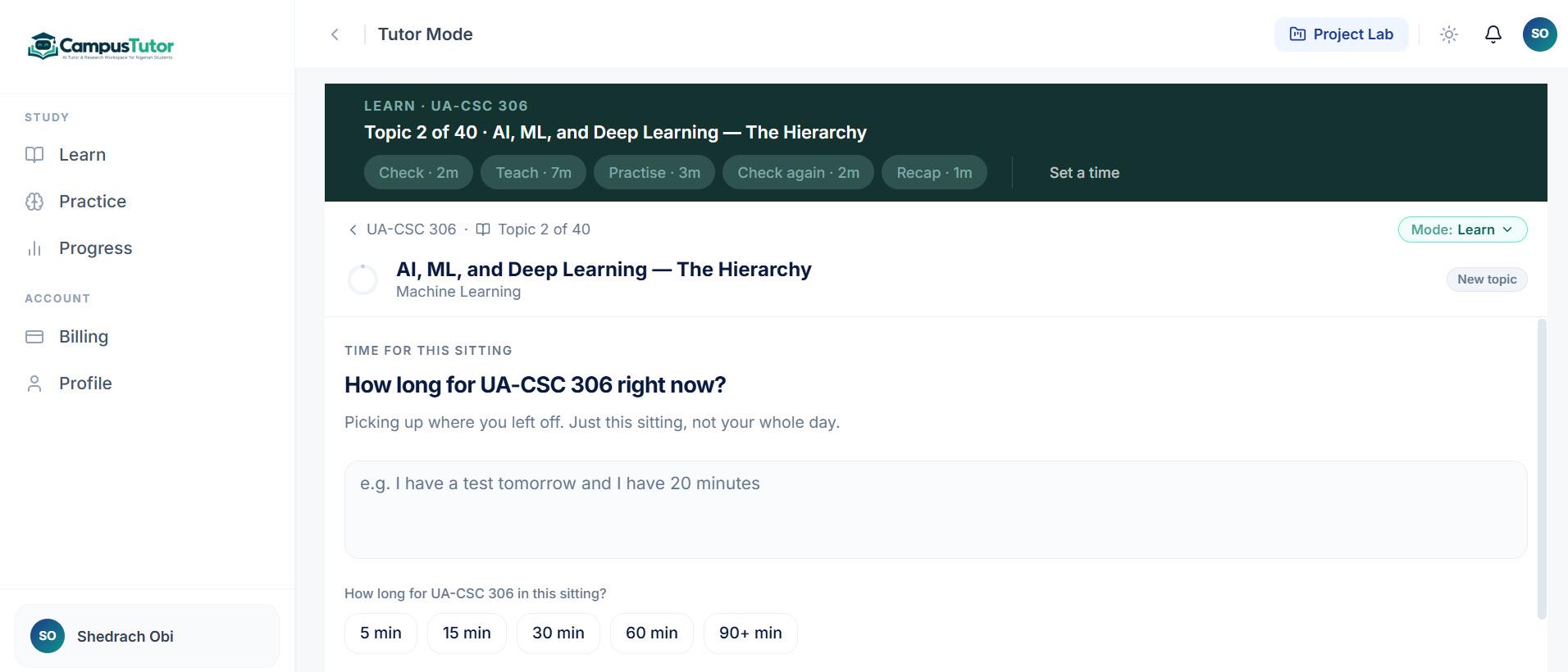
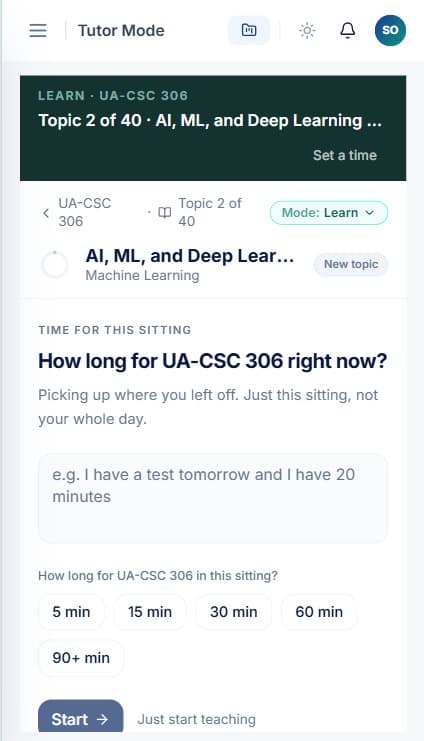
AI we’ve built and run

We publish client results only with permission, and we never invent them. This is our own AI product, live today, and the same safeguards we would build into your workflow.

CampusTutor Tutor Mode on desktop: a Machine Learning topic planned as check, teach, practise, check again and recap, with a prompt asking how long the student has
CampusTutor Tutor Mode on a phone, asking how long the student has for this sitting, with 5, 15, 30, 60 and 90+ minute options

Tekora productLive

CampusTutor

Problem
Students need patient help with their own courses, at any hour, on a phone
Workflow
A student asks about a topic or starts a research project
AI component
The AI explains from the student’s own course material, and helps find research sources
Automation
Study sessions are planned around the time a student has, and progress is tracked
Human oversight
Research sources are checked against real references before they are shown
Outcome
Live at campustutor.ng. Usage and learning results will be published once measured

A registered Nigerian company. Tekora Services is part of Tekora Global LTD, registered with the Corporate Affairs Commission (RC 9111995). We are based in Abuja and work across Africa.

Certificate of incorporation of Tekora Global LTD, company registration number 9111995, issued by the Corporate Affairs Commission of Nigeria

Corporate Affairs Commission, Nigeria

Certificate of incorporation

Company
Tekora Global LTD
Registration number
RC 9111995
Incorporated
23 December 2025
Type
Private company limited by shares, under the Companies and Allied Matters Act 2020

Shown for verification only. Not for copying or reuse

Is it worth automating? Do the sums

Start with the cost of the work as it is today. Then weigh it against what AI automation would cost to build and run. These are estimates, not promises.

Enquiries read, documents processed, emails sorted, replies written

Monthly salary divided by about 170 working hours

Time this task takes each year

920 hours
Equal to
23 full working weeks

Weigh it against

  • Building it A one-off cost to design, build and test the workflow
  • Running it AI usage, charged by the provider per request, plus hosting
  • Looking after it Monitoring and adjustments as your process changes

Times per week × minutes ÷ 60 × 46 working weeks. An estimate of time spent today, not a promise of savings. AI usually takes on part of a task, not all of it, and the audit tells you which part.

Find out what AI could take on

The right model for each task

We don’t lock you into one AI provider. Different tasks need different models, and the best choice changes as models improve.

We choose a model on

  • Task
  • Cost per request
  • Speed
  • Accuracy on your data
  • How much text it must read
  • Privacy requirements
  • Reliability
  • How it connects
AI models
  • OpenAI
  • Anthropic Claude
  • Other models where they fit
Workflows
  • n8n
  • Make
  • Zapier
  • Custom backend services
Knowledge and data
  • PostgreSQL
  • Retrieval search
  • Vector search, where needed
Connections
  • APIs
  • Webhooks
  • Cloud infrastructure

Your data, handled deliberately

We decide what data the AI sees, where it goes and who can see the results at the design stage, before anything is connected.

  • Minimum data

    The AI receives only what the task needs, nothing more.

  • Information boundaries

    Assistants answer only from the sources you approve.

  • Access controls

    People see only the results their role allows.

  • Secure connections

    Authenticated APIs and stored credentials, never shared passwords.

  • Provider settings

    We use provider options that do not train models on your data, where offered.

  • Logging

    What the AI received and returned is recorded where you need an audit trail.

  • Retention

    We agree how long data and logs are kept, and delete what isn’t needed.

  • Human review

    Sensitive actions wait for a person.

We will discuss your obligations, such as the Nigeria Data Protection Act, and design around them. We don’t claim certifications we don’t hold, and no system is risk-free.

A chatbot is one interface. AI automation is a workflow

An AI chatbot

  1. Someone asks
  2. AI replies

AI automation

  1. Something happens in your business
  2. AI interprets it
  3. The system takes the right action
  4. Other systems are updated
  5. People step in where needed

Sometimes a chat interface is part of the answer. It is rarely the whole answer.

Is AI automation right for you?

It is for some businesses, and not yet for others.

A good fit if

  • Your team handles repetitive, information-heavy tasks
  • You receive a lot of enquiries
  • You process a lot of documents
  • Staff spend hours reading and sorting information
  • You write similar replies again and again
  • You have a lot of internal knowledge in documents
  • Reports take too long to prepare
  • You already use digital systems AI could connect to
  • You want to introduce AI carefully, not randomly

Probably not yet if

  • You want a chatbot because AI is popular
  • There is no specific problem to solve yet
  • You expect AI to replace your whole team
  • You need fully autonomous decisions with no review

If that sounds like you, we would rather tell you now. A clear process often matters more than AI.

Start with an audit, not a package

Two workflows that sound alike can differ in volume, systems and risk. So we start by looking at how your work moves, then give you a written scope and price for each workflow. The audit is free, with no obligation to build.

Starting price₦900,000

₦900k – ₦1.5m
Simple AI workflow
₦1.5m – ₦3m
Business AI systems
₦3m – ₦7m+
AI agents and complex systems
₦7m+
Advanced AI platforms

Most projects land inside a typical range. Your proposal gives the fixed price for your scope

Request an AI automation audit

What shapes the cost

  • Workflow complexity
  • Number of systems connected
  • Which AI models the task needs
  • Volume of requests or documents
  • Data preparation
  • Human approval steps
  • Security requirements
  • AI usage costs at your volume
  • Monitoring and maintenance

Your questions about AI risk, answered

Sensible questions. Here is how we handle each one.

Will AI make mistakes?
Sometimes. We test on your real examples, set thresholds and send uncertain cases to people.
What if it isn’t sure?
It hands over. Low-confidence results go to a person instead of being acted on.
Can people review outputs?
Yes. You choose which outputs need approval before anything happens.
Can it use our systems?
Usually, through their APIs. We confirm each one during the audit.
What data does it need?
Only what the task requires. We agree it with you before building.
Can we limit its access?
Yes. It reads and changes only what you allow.
Can we stop it?
Yes. Any workflow can be paused, and work goes back to people.
Can we see what happened?
Yes. Inputs, outputs and approvals are logged where you need a record.
If the provider is down?
Work falls back to people, or to another model where it has been set up.
How are AI costs controlled?
We estimate usage up front, choose models by cost as well as quality, and monitor spending.
Can it change later?
Yes. Prompts, rules, models and steps can be adjusted as your process changes.

AI automation questions

Something else on your mind? Email info@tekoraservices.com or call +234 803 262 3702

What is AI automation?

Using AI for the steps in a workflow that need reading, understanding or writing, such as sorting messages, extracting details from documents or drafting replies, and connecting those steps to your systems so work moves without being retyped.

How is AI automation different from business automation?

Business automation follows fixed rules: if this happens, do that. AI automation handles steps that need interpretation, such as understanding what a customer wants. Most workflows use both.

Do I need AI?

Not always. If a process follows clear rules, ordinary automation is cheaper and more predictable. AI helps when your team spends time reading, sorting or writing. The audit tells you which applies.

Can you automate our existing workflows?

Usually, yes. We map how the work happens today, then add AI and automation to the steps where they help, keeping the rest as it is.

Can you integrate AI with our CRM?

Usually, if your CRM has an API or webhooks. AI can create and update records, add summaries and route leads inside it.

Can you integrate WhatsApp?

Yes, through the WhatsApp Business Platform. It needs a business account and approved message templates for some messages, which we help you set up.

Can you integrate Google Workspace?

Yes. Gmail, Drive, Sheets and Docs can all be part of an AI workflow, as can Microsoft 365.

Can you integrate our ERP?

Usually, if it offers an API or data export. We check your specific system during the audit.

Can AI process documents?

Yes. AI can read invoices, forms, applications, CVs and similar documents, extract the details and check them, with unclear cases sent to a person.

Can AI answer customer questions?

Yes, from information you approve. Routine questions are answered, and complaints, sensitive issues or anything unclear go to your team.

Can AI qualify leads?

Yes, against criteria you define. It reads each enquiry, identifies the need, scores it and passes a summary to sales.

Can AI read our emails?

With your permission, yes. It can sort incoming mail, summarise threads and draft replies for someone to approve.

Can AI generate reports?

It can summarise your data in plain language and highlight what changed. Significant decisions should still be checked against the numbers.

Can people review AI decisions?

Yes, and we recommend it wherever mistakes would matter. You decide which steps need approval.

How much does AI automation cost?

AI automation starts from ₦900,000 for a simple AI workflow. The final price depends on the workflow, the systems involved, the volume and the AI models needed. The audit is free and gives you a written scope and price for each workflow, plus an estimate of ongoing AI usage costs.

How long does implementation take?

A focused prototype on your own data usually takes two to four weeks. Rolling it out fully depends on what the prototype shows and how many systems are involved.

Which AI models do you use?

The one that suits the task. We work with models from providers such as OpenAI and Anthropic, and choose on accuracy, cost, speed and privacy, not habit.

Is our business data safe?

We send the AI only what each task needs, use provider settings that don’t train on your data where offered, control access and log activity. No system is risk-free, so we design for your specific obligations.

What happens when AI makes a mistake?

Validation catches many errors before they reach your systems, uncertain cases go to people, and logs show what happened so the workflow can be improved.

Do you provide maintenance?

Yes. We monitor quality and costs, adjust prompts and rules as your process changes, and switch models when a better option appears.
Don’t automate everything. Automate what matters

Tell us which work takes your team the most time. We’ll reply within two working days, and the audit is free: where AI could help, where it shouldn’t, and what it would take.

Rather describe it in writing? Email us the task that takes your team the most time