Web application development for Nigerian and African organisations

Web applications people actually use

Customer portals, staff systems, dashboards and booking platforms that people log in to and get work done in, from any browser, on any device. We design the experience and engineer the system behind it.

  • We design the experience before we build
  • You own the application and the code
  • Reply within two working days
Illustration: a portal where customers and staff work on the same requests

When your website can’t do the job any more

Most organisations reach this point gradually. The website explains what you do, but the work itself still happens in inboxes, spreadsheets and phone calls.

  • Customers can’t help themselves

    They call or email to check a status, update details or request a document, because there is nowhere to log in.

  • A process lives in a spreadsheet

    Something important runs on a shared file that breaks when two people edit it at once.

  • Information arrives in every format

    Forms by email, documents on WhatsApp, details over the phone, all retyped by hand.

  • Nobody can see where things stand

    Managers ask for updates because there is no dashboard that shows them.

  • Your current application is a struggle

    It is slow, hard to use, breaks on phones, or nobody left can change it safely.

  • Your team needs it from anywhere

    Staff in different branches, at home or in the field need the same system without installing anything.

If people need to do something, not just read something, you need more than a website

A website informs. A web application gets work done

Both open in a browser. The difference is what people do when they arrive.

A website

People read about you

  • Read
  • Browse
  • Discover
  • Contact you

For example Your services, your story, a contact form

A web application

People work with you

  • Log in
  • Submit information
  • Manage their account
  • Process tasks
  • Work with data
  • Complete workflows
  • Get results
  • Connect to other systems

For example A portal, a dashboard, a booking system, a staff workspace

Many organisations need both: a website that brings people in, and an application they log in to. We build both, and connect them. Need a website instead? See web development

What we build

Browser-based applications for the people you serve, the people you employ and the data that connects them.

  • Customer portals

    Secure access for customers to their accounts, documents, requests and payments, without calling your team.

  • Employee portals

    One place for staff to manage tasks, find information and move requests through approval.

  • Management dashboards

    Business data turned into live views that show managers what needs attention today.

  • Booking and appointment systems

    Customers book, reschedule and pay. Your team sees the calendar, capacity and no-shows.

  • Application platforms

    Collect, review and decide on applications online: admissions, grants, onboarding or permits.

  • Learning platforms

    Courses, student dashboards, progress tracking and assessments, built to work on a phone.

  • Data and reporting applications

    Data collected from the field or several systems, stored in one place and reported on automatically.

  • Business web applications

    An application shaped around one workflow that matters, with its own rules, stages and roles.

Need one of these? Tell us who will use it and what they need to do

Build my web app

Designed around the people who use it

A web application isn’t a list of features. It is the path someone takes to finish a task, and how easy that path feels decides whether they use it. We design that path first.

  • Users

    Who logs in, and what each of them came to do

  • Tasks

    The most frequent job made the easiest

  • Information

    What each person needs to see, and nothing else

  • Navigation

    Never more than a step or two from what matters

  • Permissions

    Each role sees and changes only what it should

  • Workflows

    Stages and hand-offs that match how work moves

  • Feedback

    Clear confirmation after every action, and helpful errors

  • Performance

    Fast on mid-range phones and mobile data

One task, start to finish

Step 1 of 5

Amaka signs in. The application knows her role and what she is allowed to do

What your application can do

Grouped by what they do for the people using it. We build what your users need, not everything on this list.

  • Accounts and access

    The right people, the right permissions

    • Sign-up and sign-in
    • Password recovery
    • Profiles
    • Roles and permissions
  • Data

    Information people can find and trust

    • Records
    • Search, filters and sorting
    • Imports and exports
    • File and document uploads
  • Workflows

    Work that moves without chasing

    • Forms with validation
    • Approvals
    • Task assignment
    • Status tracking
  • Dashboards

    Decisions made on current numbers

    • Key figures
    • Charts and reports
    • Activity feeds
    • Usage analytics
  • Communication

    People hear about what affects them

    • Email
    • In-app notifications
    • SMS and WhatsApp, where appropriate
    • In-app messaging, where needed
  • Integrations

    No retyping between systems

    • APIs and webhooks
    • Paystack and Flutterwave
    • CRM and ERP connections
    • Other third-party platforms

One application, every screen

Your users won’t all be at a desk. The same application works on a laptop in the office, a tablet at reception and a phone in the field, with nothing to install.

  • Responsive layouts Screens rearranged for each size, not shrunk
  • Touch-friendly controls Buttons and forms sized for thumbs
  • Fast loading Built for mid-range phones and mobile data
  • Clear navigation The same places in the same order on every device
  • Installable, where it helps Add it to a home screen like an app, without an app store
Illustration: the same dashboard on a laptop, a tablet and a phone

What it looks like in practice

Four common shapes a web application takes. Each is an illustration to help you picture your own.

  • For customers and clients

    Customer portal

    1. Customer logs in
    2. Views their account
    3. Submits a request
    4. Tracks its status
    5. Gets notified when it’s done
  • For employees and managers

    Staff system

    1. Employee logs in
    2. Sees their tasks
    3. Processes a request
    4. Submits it for approval
    5. Manager reviews and decides
  • For applicants and reviewers

    Application platform

    1. Applicant registers
    2. Fills in their details
    3. Uploads documents
    4. Receives confirmation
    5. Your team reviews and responds
  • For leadership

    Management dashboard

    1. Data enters the system
    2. It is checked and processed
    3. It appears in charts and reports
    4. Management reviews
    5. A decision is made on current numbers

Recognise one of these? Tell us who needs to log in and what they need to do

Build my web app

Connected to the tools you already use

Your web application doesn’t have to work alone. It can take payments, send messages and share data with the systems your organisation already runs on.

Payments
  • Paystack
  • Flutterwave
  • Other payment gateways
Business systems
  • CRM systems
  • ERP systems
  • Accounting software
Workplace tools
  • Google Workspace
  • Microsoft 365
  • Email
Messaging
  • SMS
  • WhatsApp Business Platform
  • Email notifications
Data and storage
  • Your databases
  • Cloud storage
  • External APIs
AI
  • Large language models
  • Document processing

If a system has an API, or can export its data, we can usually connect to it. We confirm what is possible with each of your systems before anything is promised.

An interface, or a working system?

A form that only sends an email is an interface. A working system acts on what people submit: it checks it, records it, routes it and tells everyone who needs to know.

See business automation

Example: one form submission

  1. A user submits a formPerson
  2. The application checks the details
  3. A record is created
  4. The right employee is notified
  5. A task is assigned
  6. The user receives a confirmation
  7. The dashboard updates

AI, when it makes the application better

Most web applications don’t need AI to be useful. Some tasks inside them do: reading documents, finding the right record or answering questions. We add it there, after the core problem is solved.

  • Assistants that answer from your own information
  • Reading and extracting data from documents
  • Search that understands questions
  • Sorting and routing requests
  • Summarising long records
  • Recommendations based on behaviour

The application solves the business problem first. AI is added only where it saves real time, with a person checking results where mistakes would matter. See AI automation

Access, controlled from the first screen

When people log in, they trust you with their information. We decide who can see and change what at the design stage, before the first screen is built.

  • Secure sign-in

    Strong authentication, with two-step verification where you need it.

  • Roles and permissions

    Each person sees and changes only what their role allows.

  • Session management

    Sessions that expire, and sign-out that works everywhere.

  • Validated input

    Every submission checked on the server, so bad data and malicious input are rejected.

  • Secure APIs

    Authenticated connections between the application and other systems.

  • Audit logs

    A record of who did what and when, for the actions that matter.

  • Backups

    Regular backups, and a tested way to restore them.

  • Monitoring

    Errors and unusual activity alert us before they become problems.

We discuss where your data is stored, who can access it and any rules you must meet, such as Nigeria’s data protection law. We don’t claim certifications we don’t hold.

Fast today, and ready for more users

How an application is built decides how it feels with ten users and with ten thousand. We design for the growth you expect, without complexity you don’t need yet.

  • Fast page loads

    Only what each screen needs is sent to the browser.

  • Efficient queries

    Data modelled so the screens people use most stay quick as records grow.

  • Caching, where it helps

    Frequently read information served without rebuilding it each time.

  • Optimised assets

    Images and code sized for mobile data.

  • Reliable APIs

    Predictable responses, with retries where other systems fail.

  • Room to grow

    Infrastructure that scales up with usage, and monitoring that shows when it should.

We hold our own products to this. Google PageSpeed Insights scored campustutor.ng, our live web application, 99 for mobile performance and 100 on desktop on 29 September 2026. See the reports

From scattered tools to one application

Moving a process online isn’t about technology for its own sake. It replaces the patchwork that slows your team down.

Before

  • Email
  • Spreadsheets
  • WhatsApp groups
  • Paper forms
  • Manual updates
  • Disconnected information

After

  • One web application
  • Centralised data
  • Defined workflows
  • User accounts
  • Dashboards
  • Notifications
  • Reporting

Is one of your processes still running on email and spreadsheets?

Discuss your web app

How we build your web application

Nine steps in three phases. Each ends in something you can see and approve, so you always know what is being built and what comes next.

  1. Plan

    1. Discover

      Your users, the business problem and what success looks like.

    2. Define

      Requirements written down, and features prioritised into releases.

    3. Design

      User flows, wireframes and interface design your team can click through.

  2. Engineer

    1. Architect

      The data model, integrations and technical plan.

    2. Build

      Interfaces, backend and core features, reviewed with you every week or two.

    3. Integrate

      Payments, messaging and your other systems connected.

  3. Launch

    1. Test

      Function, usability, security and performance, then with real users.

    2. Deploy

      Released with monitoring, backups and a way to roll back.

    3. Improve

      Feedback and usage data turned into the next release.

Why organisations choose Tekora

Not adjectives. Things you can check.

  1. We build and run our own web applications

    CampusTutor is live at campustutor.ng, and we host and maintain it ourselves. We know what it takes to keep an application working after launch, because we do it.

  2. Product thinking before code

    We start with who uses the application and what they need to get done, then decide what to build.

  3. Design and engineering in one team

    The people who design your screens work beside the people who build them, so nothing is lost in a hand-off.

  4. Built for how Africa uses the web

    Mid-range phones, mobile data, naira payments and WhatsApp-first customers are the starting point, not an afterthought.

  5. Measured, not claimed

    Our own applications are tested publicly for speed and accessibility, and we show the results.

  6. A partner after launch

    Support, maintenance and continued development, or a full handover to your own team.

Web applications we’ve built and run

We publish client results only with permission, and we never invent them. These are our own applications: you can open one today.

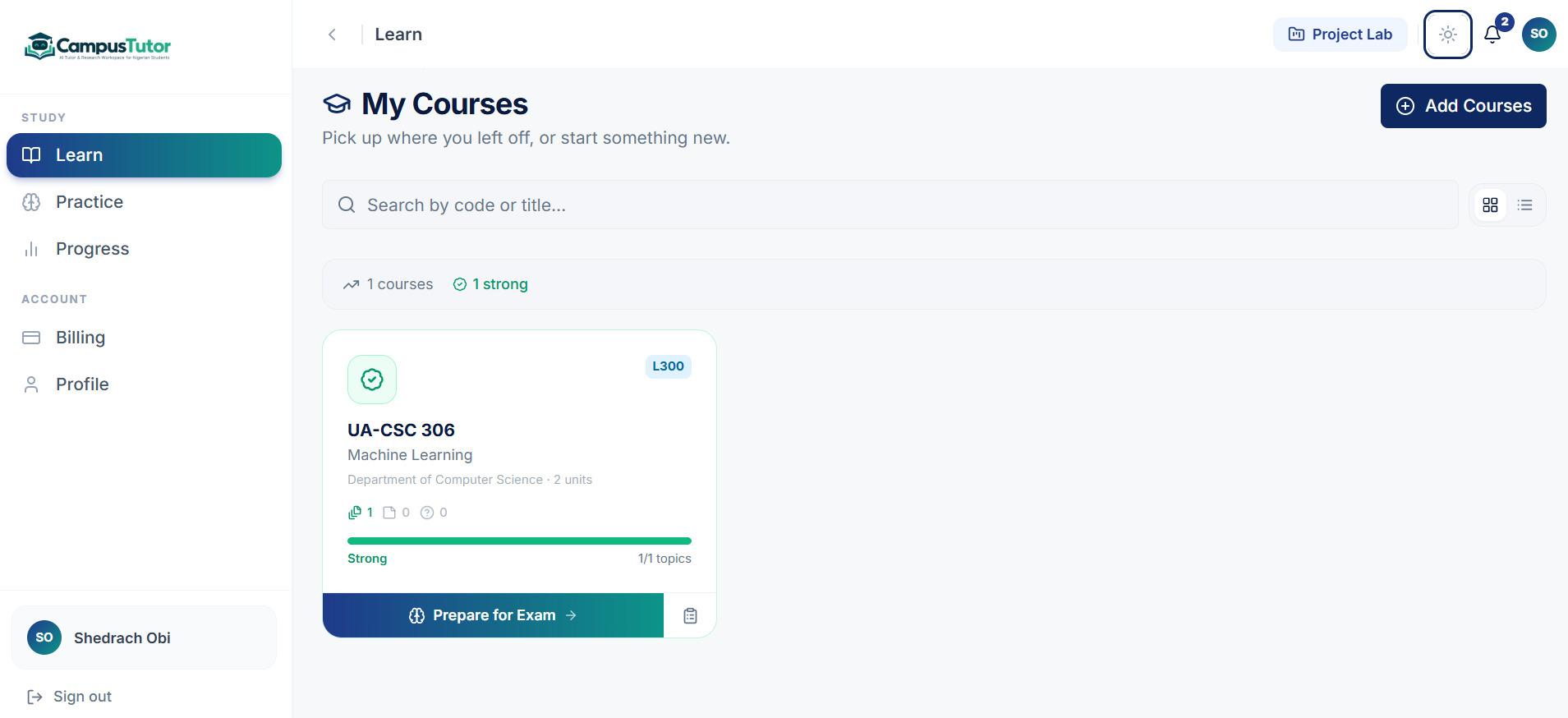
CampusTutor’s My Courses screen: a Machine Learning course card with topic progress marked Strong and a Prepare for Exam button
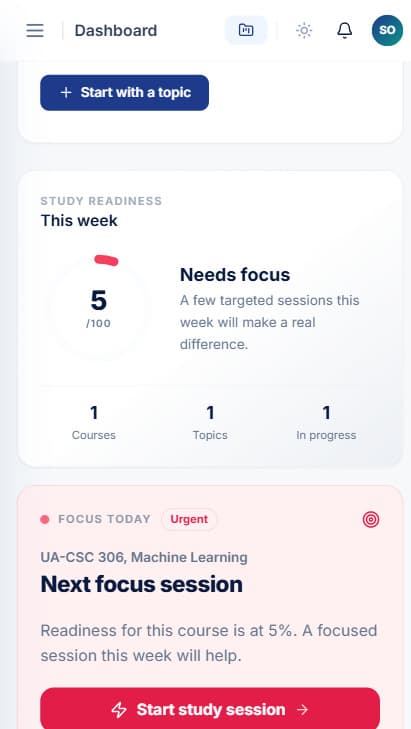
CampusTutor dashboard on a phone: a weekly study readiness score and a Focus Today card suggesting the next study session

Tekora productLive

CampusTutor

Problem
Students need patient, personal help with their own courses, at any hour, on a phone
Users
Students at Nigerian universities, polytechnics and colleges
Application
An AI tutor and research workspace, live at campustutor.ng
Key functionality
  • Accounts and personal dashboards
  • Course tracking with a weekly readiness score
  • Tutor sessions planned around the time a student has
  • A project workspace with sources checked against real references
Technology
Next.js, React, Tailwind CSS, NestJS, Python, Docker, Cloudflare, Cloudflare R2, Progressive Web App
Outcome
Live. PageSpeed Insights: 99 for mobile performance, 100 for accessibility, best practices and SEO (29 September 2026). Usage results will be published once measured
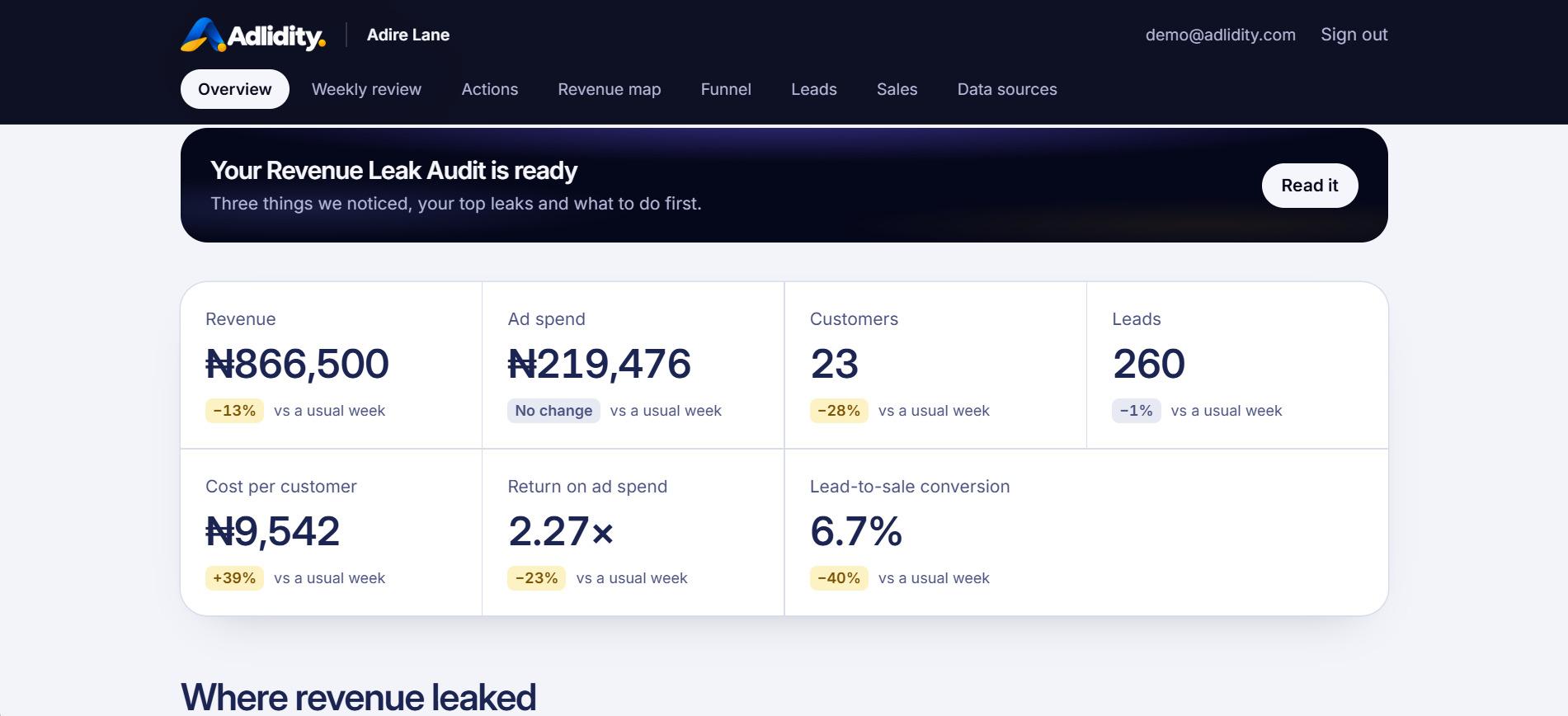
Adlidity overview for a demo business, Adire Lane: a Revenue Leak Audit banner above revenue, ad spend, customers, leads, cost per customer, return on ad spend and lead-to-sale conversion, each compared with a usual week
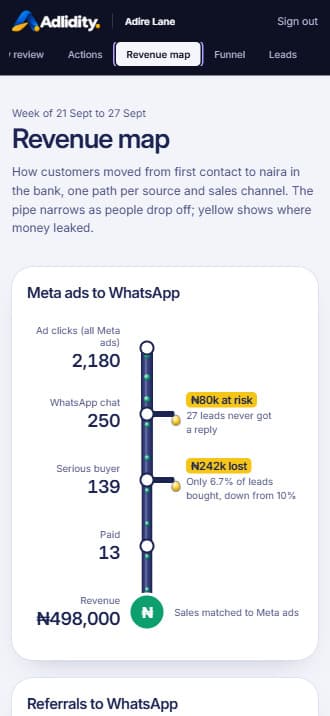
Adlidity revenue map on a phone: Meta ad clicks narrowing to WhatsApp chats, serious buyers, paid customers and revenue, with naira amounts marked where leads were lost

Tekora productIn development

Adlidity

Problem
Business owners can see ad spend and sales, but not where customers are lost in between
Users
Owners of growing Nigerian businesses
Application
A revenue intelligence application, in development
Key functionality
  • Several data sources brought into one view
  • Key figures compared with a usual week
  • A revenue map that follows each source to payment
  • A weekly review generated automatically
Technology
Next.js, React, TypeScript, Node.js, Tailwind CSS, Docker, pnpm
Outcome
In active development. No usage figures yet, so we don’t quote any

A registered Nigerian company. Tekora Services is part of Tekora Global LTD, registered with the Corporate Affairs Commission (RC 9111995). We are based in Abuja and work across Africa.

Certificate of incorporation of Tekora Global LTD, company registration number 9111995, issued by the Corporate Affairs Commission of Nigeria

Corporate Affairs Commission, Nigeria

Certificate of incorporation

Company
Tekora Global LTD
Registration number
RC 9111995
Incorporated
23 December 2025
Type
Private company limited by shares, under the Companies and Allied Matters Act 2020

Shown for verification only. Not for copying or reuse

Technology chosen to last

We pick established, well-supported tools, so your application is fast, secure and easy to maintain and hire for, long after launch.

  • Performance

    Interfaces that load quickly on ordinary phones, not only in the office.

  • Security

    Mature frameworks with security built in, kept up to date.

  • Maintainability

    Widely used tools, clean structure and documentation, so any competent team can work on it.

  • Integration

    APIs and webhooks designed in, so the application can connect to what comes next.

Interfaces
  • Next.js
  • React
  • TypeScript
Backend
  • Node.js
  • NestJS
  • REST APIs
  • Webhooks
Data
  • PostgreSQL
  • Cloud storage
Infrastructure
  • Cloudflare
  • Docker
  • CI/CD
  • Monitoring

Web application, SaaS or custom software?

The names overlap, so here is the plain difference. If another one describes you better, start there.

  • Web applicationThis page

    An interactive system people open in a browser to do tasks or work with data.

    Best when You need people to log in and get something done

  • SaaS development

    A software product you sell to many customers, each with their own account and subscription.

    Best when The application is the product you sell

  • Custom software

    A purpose-built system shaped around one organisation’s whole operation.

    Best when Several departments and processes need one system

  • Business automation

    Repetitive steps automated and existing tools connected, without a new application.

    Best when Your tools are fine, the work between them isn’t

Do you need a web application?

Not every organisation does. Here is how to tell.

A web application may be right if

  • You need users to log in
  • Customers or staff need a portal
  • People need to submit information or documents
  • You need dashboards on current data
  • A process needs defined steps and approvals
  • Information should live in one place
  • You need to replace an old web application
  • Several systems need to be connected
  • The application has to grow with you

You may not need one if

  • You mainly need to be found and explain what you doA well-built website will do that for less. See web development
  • Existing software already does the jobUse it. We may be able to connect it to your other tools instead. See business automation

Priced on scope, after we understand it

A booking page for one branch and a portal for thousands of customers are different projects. We learn who uses the application and what they need to do, then send a written scope with a fixed price for each release.

Starting price₦1,500,000

₦1.5m – ₦8m+
Depending on users, roles, workflows, integrations and data

Most projects land inside a typical range. Your proposal gives the fixed price for your scope

Request a web app assessment

What shapes the cost

  • Number of users and user types
  • Features and workflows
  • Roles and permissions
  • Integrations
  • Data and migration
  • Security requirements
  • Design complexity
  • AI features
  • Infrastructure and hosting
  • Timeline
  • Maintenance after launch

How we keep your project on track

Application projects go wrong in predictable ways. Here is how we handle each one.

Requirements
Written down with you during discovery, in plain language, and agreed before development starts.
Changes
Expected, and agreed in writing with their effect on time and cost before they are built.
Progress
Working software to review every week or two, not status reports.
Testing
Function, usability, security and performance, then with your users on real tasks before launch.
Security
Access and data protection planned at the design stage, not added at the end.
Deployment
Released with monitoring in place and a way to roll back.
Ownership
The application, the code, the data and the documentation are yours.
Existing systems
Checked during discovery, so you know what can be connected before you commit.
After launch
Maintenance, support and new features as your needs change, or a full handover to your team.

Web application questions

Something else on your mind? Email info@tekoraservices.com or call +234 803 262 3702

What is a web application?

Software that runs in a web browser, which people log in to and use to get something done: submit a request, manage an account, process work or see live data. Nothing has to be installed.

How is a web application different from a website?

A website mainly gives information: people read it and contact you. A web application lets people act: they log in, submit, manage and track. Many organisations need both, connected.

How much does a web application cost?

Web applications start from ₦1,500,000. The final price depends on the number of users and roles, the features and workflows, integrations, data and security requirements. After we understand the project, we send a written scope with a fixed price for each release, so you know the cost before work starts.

How long does web application development take?

A first release typically takes eight to fourteen weeks, depending on scope. Larger applications grow in stages after that, each one planned and priced separately.

Can you build a customer portal?

Yes. Secure portals where customers log in to see their account, submit requests, upload documents, pay and track progress.

Can you build an employee portal?

Yes. Internal portals where staff manage tasks, submit requests, get approvals and find information, with access based on their role.

Can you build dashboards?

Yes. Dashboards that show live figures, charts and reports from your application and the systems connected to it, for each role that needs them.

Can users log in with their own accounts?

Yes. Sign-up, sign-in, password recovery and profiles are standard, with roles and permissions so each person sees only what they should. Two-step verification can be added.

Can you integrate Paystack?

Yes. We integrate Paystack for one-off payments and subscriptions, and confirm every payment with Paystack before the application records it as paid.

Can you integrate Flutterwave?

Yes, in the same way: payments are confirmed with Flutterwave before the application treats them as received.

Can you integrate WhatsApp?

Yes, through the WhatsApp Business Platform, for notifications and updates to people who agree to receive them. It needs a business account and approved message templates, which we help you set up.

Can you connect our CRM?

Usually, if it offers an API or a way to export data. We check your specific CRM before anything is agreed.

Can you connect our ERP?

Usually, on the same basis. We confirm what your ERP allows during discovery and tell you exactly what can be connected.

Can you add AI?

Yes, where it saves real time: reading documents, smarter search or assistants that answer from your own information. We don’t add AI where a simple rule would do.

Can you rebuild our existing web application?

Yes. We review what you have, keep what works, and rebuild in stages where possible so your users aren’t left without a system.

Can you migrate our data?

Yes. We move data from your current application or spreadsheets, check it against the source, and run the old and new systems side by side if needed.

Will the application work on mobile?

Yes. Every application we build is designed for phones, tablets and desktops, and tested on mid-range phones and mobile data.

Who owns the source code?

You do. The application, the code, the data and the documentation are yours, whoever hosts and maintains it.

Do you provide maintenance?

Yes. We offer support and maintenance after launch, and can keep adding features as your needs change. If you’d rather run it yourselves, we hand everything over with documentation.
Your process already exists. Let’s give it an application

Tell us who needs to log in and what they need to get done. We’ll reply within two working days with honest advice on whether a web application is the right answer, and what it would take. The first consultation is free.

Not sure what you need yet? Email us what your users need to get done